
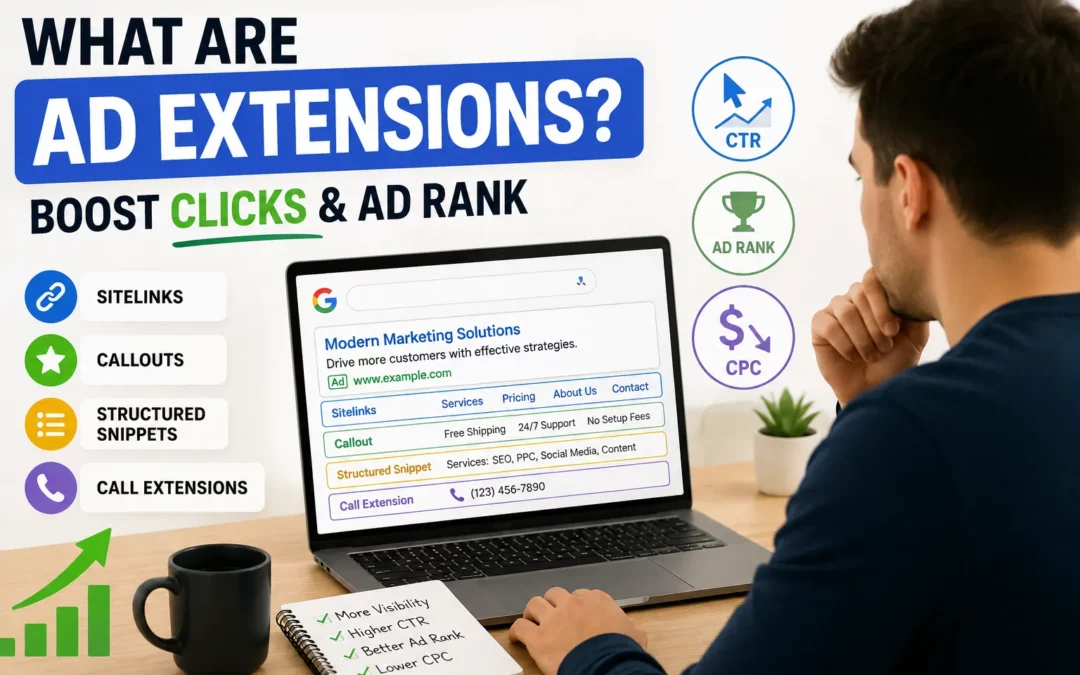
Ad extensions are additional pieces of information you attach to your Google Ads that expand your ad beyond the standard headline and description. They can show your business phone number, links to specific pages on your website, your store location, customer reviews, product prices, and more all within the same ad unit on the search results page.
Ad extensions matter for two reasons. First, they make your ad larger and more informative, which increases the likelihood that users click. Second, Google factors the expected impact of your extensions directly into your Ad Rank calculation meaning advertisers who use relevant extensions earn better positions even against competitors with higher bids. Therefore, adding extensions is one of the most cost-effective improvements available in any Google Ads account. Not sure which extensions to add to your campaigns first? Our SEM community shares setup tips and real performance data join us here.
What Are Ad Extensions and How Do They Work?
Ad extensions are supplementary formats that attach to your standard text ad and display additional information to users on the search results page. Google decides when to show extensions based on the relevance of the extension to the search query, the expected improvement in CTR, and your Ad Rank at the time of the auction.
You do not pay extra for extensions themselves. If a user clicks a sitelink extension rather than your main ad headline, you pay the same CPC as a click on the headline. Extensions only add cost when they generate clicks they never charge for impressions alone.
Extensions work within the same auction system that determines your overall ad placement. Because Ad Rank is calculated using your bid, Quality Score, and the expected impact of ad formats, extensions are a direct input into how Google positions your ad on the page. Advertisers who skip extensions consistently underperform those who configure them well, even at identical bids.
Google renamed “ad extensions” to “assets” in 2022, though the term “extensions” remains widely used and understood. Both terms refer to the same feature set.
Why Ad Extensions Improve Performance
The performance benefits of ad extensions compound across multiple dimensions:
Increased visual real estate. Extensions expand the physical size of your ad on the page. A larger ad is harder to miss and occupies more of the user’s screen, particularly on mobile. This size advantage alone improves CTR independent of any informational benefit.
Higher CTR from additional click paths. Sitelink extensions, for example, give users four to six additional clickable links beyond your main headline. Each represents a different entry point tailored to different user intentions allowing the same ad to serve multiple segments simultaneously.
Direct Ad Rank improvement. Google’s expected impact of extensions is an explicit component of the Ad Rank formula. Well-configured, relevant extensions boost your Ad Rank without any increase in your bid effectively giving you a free position improvement.
Better Quality Score over time. Higher CTR from extensions feeds back into the Expected CTR component of Quality Score, which compounds into lower actual CPCs across your campaigns.
Richer information reduces wasted clicks. Extensions that show pricing, hours, or specific features help users self-qualify before clicking. Users who click after seeing your price or location are more likely to convert — reducing spend on exploratory clicks.
The Main Types of Ad Extensions
Google offers numerous extension types. These are the most important for search campaigns:
Sitelink Extensions
Sitelinks are additional links to specific pages on your website that appear beneath your main ad. They are the most widely used and highest-impact extension type.
What they look like: Four to six additional blue hyperlinks beneath your ad, each with a short headline and optional two-line description.
Best sitelink destinations:
- Pricing page
- Specific product or service category pages
- About or team page
- Contact or get a quote page
- Case studies or testimonials
- Free trial or demo page
Best practice: Write sitelink headlines that are action-oriented and distinct from each other. Each should appeal to a different user intent or buying stage. Include descriptions for each sitelink Google shows these on desktop and they significantly improve CTR.
Callout Extensions
Callouts are short, non-clickable text snippets that highlight key benefits, features, or differentiators. They appear as a string of phrases beneath your ad copy.
What they look like: “Free Shipping · 24/7 Support · No Setup Fees · Cancel Anytime”
Best uses:
- Unique selling propositions that differentiate from competitors
- Trust signals (“BBB Accredited,” “10,000+ Customers”)
- Feature highlights that do not fit in the main description
- Offer details (“30-Day Free Trial,” “No Credit Card Required”)
Best practice: Write at least six callouts and let Google rotate the best-performing ones. Keep each callout under 25 characters for maximum display consistency. Focus on specifics rather than generic phrases “Save 40% on annual plans” outperforms “Great value.”
Structured Snippet Extensions
Structured snippets display a predefined list of your products, services, features, or other categorical information under a specific header category.
Available headers include: Amenities, Brands, Courses, Degree programs, Destinations, Featured hotels, Insurance coverage, Models, Neighborhoods, Service catalog, Shows, Styles, Types
What they look like: “Services: SEO, Google Ads, Social Media, Email Marketing, Analytics”
Best uses:
- Product or service category listings
- Geographic coverage areas
- Feature lists for software or technology products
- Available models, styles, or variants for e-commerce
Best practice: Use the header that most precisely matches your offering. Provide at least three to four values per header. Structured snippets are particularly effective for businesses with clear, enumerable offerings.
Call Extensions
Call extensions add your phone number directly to the ad, making it clickable on mobile devices to initiate a call instantly.
What they look like: Your ad plus a prominent phone number, with a call button on mobile.
Best uses:
- Service businesses where phone inquiries lead to high-value customers
- Local businesses where immediate availability matters
- Any campaign targeting mobile users with purchase intent
Best practice: Set call extensions to show only during business hours when someone can answer. Enable call reporting in Google Ads to track calls as conversions. Use a tracking number for accurate attribution.
Location Extensions
Location extensions connect your Google Business Profile to your ad, displaying your business address, hours, and a map pin beneath the ad.
What they look like: Your ad plus address, hours, and distance from the user’s current location.
Best uses:
- Brick-and-mortar businesses driving foot traffic
- Service area businesses targeting local customers
- Any advertiser whose physical location is a competitive advantage
Best practice: Ensure your Google Business Profile is fully optimized and accurate before connecting it. Location extensions automatically pull data from your profile inaccurate profile information shows in your ads.
Price Extensions
Price extensions display your products or services with their prices in a grid format beneath the ad, allowing users to compare options before clicking.
What they look like: A structured table showing product/service name, short description, and price — each row is clickable to a specific landing page.
Best uses:
- SaaS products with tiered pricing plans
- Service businesses with defined service packages
- E-commerce products with clear price points
- Any advertiser where price transparency is a competitive advantage
Best practice: Only use price extensions when your pricing is genuinely competitive. Extensions that reveal high prices without context can reduce CTR. Include the starting price for ranges rather than hiding costs.
Image Extensions
Image extensions add a square image alongside your text ad on eligible placements, making it visually distinctive on the search results page.
What they look like: A cropped square image displayed to the right of your ad text on desktop, or above on some mobile placements.
Best uses:
- Product-focused advertisers where visual representation improves relevance
- Service businesses that can show recognizable imagery (real estate, hospitality, food)
- Brand campaigns where visual identity reinforcement matters
Best practice: Use high-quality, clear images that directly represent what you are advertising. Avoid text-heavy images — Google’s image guidelines restrict significant text overlay.
Lead Form Extensions
Lead form extensions allow users to submit their contact information directly within the search results page — without visiting your website.
What they look like: A “Get quote” or “Learn more” button that expands into a form within the SERP, pre-populated with the user’s Google account information.
Best uses:
- B2B lead generation where minimizing friction matters
- High-consideration purchases where initial contact precedes conversion
- Service businesses collecting quote requests
Best practice: Keep the form as short as possible each additional field reduces completion rate. Set up a thank-you message that delivers immediate value. Connect to your CRM through webhook integration.
Automated Extensions: What Google Adds Without You
In addition to manually configured extensions, Google automatically generates and shows certain extensions based on information from your website and ad content:
- Dynamic sitelinks: Google generates sitelinks from your site’s pages automatically
- Dynamic callouts: Generated from your website content
- Seller ratings: Displayed when your business has sufficient Google reviews (typically 100+ reviews above 3.5 stars)
- Dynamic structured snippets: Generated from your site’s structured content
- Automated location extensions: Generated from your Google Business Profile
Automated extensions appear when Google predicts they will improve performance. You can review which automated extensions are showing in your Google Ads account under the Assets section. If automated extensions are generating inaccurate information, you can disable specific automated extension types at the account level.
How to Prioritize Which Extensions to Add First
With many extension types available, beginners should prioritize based on impact and setup simplicity:
Add immediately (highest impact, easy setup):
- Sitelink extensions — four to six links to your most important pages
- Callout extensions — six to eight key differentiators
- Structured snippets — relevant product or service categories
Add in the first week: 4. Call extensions if phone calls are a conversion goal 5. Location extensions if physical location matters to your customers
Add as campaigns mature: 6. Price extensions when pricing is transparent and competitive 7. Image extensions when visual content is available and relevant 8. Lead form extensions for B2B lead generation campaigns
This prioritization reflects both the reach and the ease of setup. Sitelinks, callouts, and structured snippets take 20–30 minutes to configure and deliver immediate Ad Rank and CTR benefits. More specialized extensions require additional setup or content but serve specific campaign goals.
Ad Extensions and Their Relationship to the Full SEM System
Extensions do not operate in isolation. They are one element of a larger system where every component reinforces the others. How the complete SEM auction system evaluates your ads shows clearly that extensions connect to Quality Score, which connects to Ad Rank, which connects to CPC and position meaning a well-configured extension strategy has compounding financial benefits throughout the campaign.
For advertisers also building organic search presence alongside their paid campaigns, it is worth noting that the trust signals that perform well as callout extensions customer counts, awards, guarantees are the same credibility elements that strengthen E-E-A-T signals for SEO content. The messaging that converts in paid search often reveals what resonates organically as well.
FAQs
Do ad extensions cost extra in Google Ads?
No. Adding extensions to your campaigns does not increase your cost. You pay only when a user clicks either on your main ad or on one of your extensions at the same CPC rate. Extensions that generate no clicks generate no cost.
Why are my extensions not showing?
Extensions show only when Google predicts they will improve performance and when your Ad Rank is sufficient. Common reasons for extensions not showing: Ad Rank too low to trigger extension display, extensions disapproved due to policy violations, extension scheduling set to incorrect hours, or the query context not being relevant to the specific extension.
How many sitelinks should I add?
Add at least four sitelinks, with descriptions for each. Google can show two, four, or six sitelinks depending on the device and placement. More options give Google more combinations to test and optimize. Eight to ten sitelinks is common for well-structured accounts.
Can I schedule extensions to show at specific times?
Yes. Extensions can be scheduled at the campaign or ad group level using start and end dates, as well as day-of-week and hour-of-day scheduling. Call extensions in particular should be restricted to business hours when someone is available to answer.
Do extensions affect my Quality Score?
Extensions indirectly improve Quality Score by increasing CTR — the Expected CTR component of Quality Score benefits from any extension that makes your ad more clickable. Extensions do not directly change your Quality Score rating but create the conditions for it to improve over time.
What is the difference between callout extensions and structured snippets?
Callouts are free-form short phrases highlighting any benefit or feature. Structured snippets are formatted under a specific predefined header category (Services, Products, Brands, etc.) and display as a labeled list. Both are non-clickable. Use callouts for unique selling points and structured snippets for categorical product or service listings.
Should I use automated extensions or manual ones?
Use both. Configure your highest-priority extensions manually for full control over messaging and destinations. Allow automated extensions to supplement where they are accurate and relevant. Review automated extension performance regularly and disable any that show inaccurate or unhelpful information.
Conclusion
Ad extensions are one of the few optimizations in Google Ads that improve multiple metrics simultaneously at no additional cost. They expand your ad’s visibility, increase CTR, contribute to Ad Rank, and help users self-qualify before clicking all without raising your bids.
Every campaign without sitelinks, callouts, and structured snippets at minimum is leaving measurable performance improvement on the table. Configure the essential three extension types in your first session with any new campaign, then add specialized extensions as campaigns mature and specific conversion goals become clear.
The principle that runs through every element of SEM from how the auction determines your position to how keywords determine who sees your ads is that relevance and quality are always rewarded. Extensions are the format-level expression of that principle: more relevant, more informative ads earn better outcomes at lower costs. Want help configuring extensions for your specific campaign goals? Our community includes practitioners who have optimized extensions across industries and campaign types join us here.