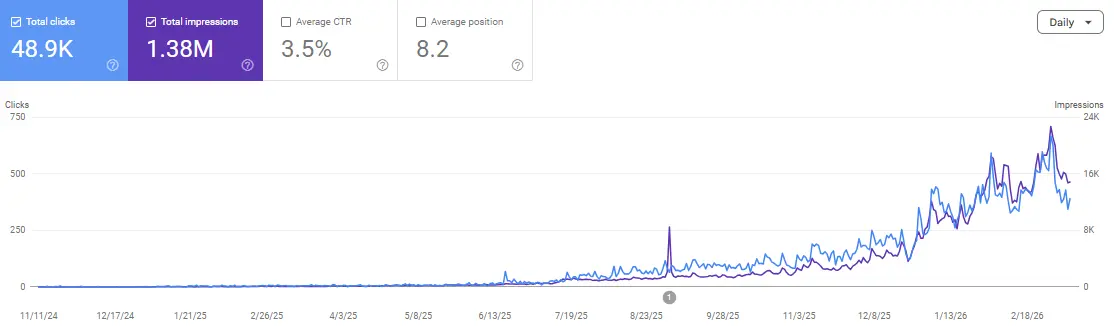
Before building another list of AI-generated content ideas, look at the questions your website already appears for.
Google Search Console can help you find longer searches, identify the associated pages, and investigate whether those pages answer the underlying need. A query-length filter makes the first review faster.
This GEO hack uses a Search Console regex to surface queries containing eight or more whitespace-separated terms. You then review their meaning, map them to existing pages, and improve confirmed information gaps.
The value comes from the investigation after filtering. The regex does not reveal private AI prompts, classify intent, or guarantee a citation.
What the Search Console GEO Hack Actually Finds
The LinkedIn example supplied with this article suggests filtering longer queries, selecting those with many impressions and few clicks, and adding a direct answer to the page already appearing for them.
That is a useful starting point. Two details need checking:
- A long query is not necessarily a question.
- High impressions and low clicks do not establish that a missing answer caused the result.
Treat the output as a candidate list. Each query still needs an intent check and a page-level review.
For readers comparing SEO, AEO, and GEO, this is a practical connection between the disciplines: use observed search demand to improve useful answers, then evaluate search and AI visibility separately.
Step 1: Apply the Query-Length Regex
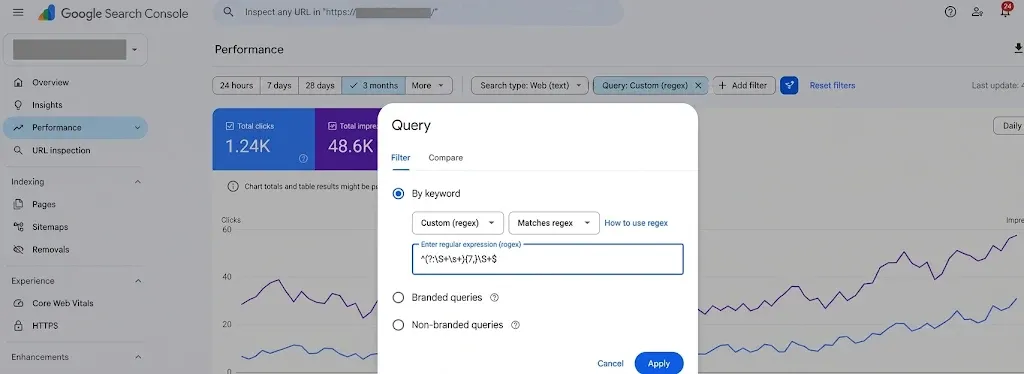
In Google Search Console:
- Select the intended website property.
- Open Performance → Search results.
- Choose a date range appropriate to your site’s activity.
- Select Add filter → Query → Custom (regex).
- Choose Matches regex.
- Paste the expression below and apply it.
^(?:\S+\s+){7,}\S+$Google’s filtering documentation confirms that Search Console uses RE2 syntax and supports custom regex query filters.
For a first review, you might use three months to gather a broader set of examples. That is a workflow suggestion, not a required reporting window. Use a shorter period when investigating a recent change.
Keep the selected search type consistent. Use the text-based web search option when reviewing text queries.
Why This Matches Eight Words, Not Seven
The expression contains:
- ^: the start of the query.
- \S+: one or more non-whitespace characters.
- \s+: one or more whitespace characters.
- {7,}: at least seven repetitions of the preceding group.
- A final \S+: one additional term.
- $: the end of the query.
Seven term-and-space groups plus a final term gives at least eight terms. The RE2 syntax reference documents these operators.
For example:
how can I export paid invoices to CSVThis has eight terms and matches.
how can I export invoices to CSVThis has seven terms and does not match.
invoice software for small teams with csv exportThis also matches, despite not being a complete question.
The filter counts whitespace-separated terms, not linguistic words in every language. It is less suitable for languages commonly written without spaces.
Step 2: Adjust the Filter to Your Dataset
Eight terms is a starting threshold, not a definition of valuable demand.
If too few relevant rows appear, lower the threshold. For five or more terms, use:
^(?:\S+\s+){4,}\S+$If you want a separate English question-starter review, try:
^(how|what|why|when|where|who|which|can|could|should|does|do|is|are)\s+This second expression checks the beginning of a query. It does not require eight terms and does not capture every question.
Use it as an alternative review pass. Some useful queries begin with a product name; some relevant instructions are written as statements.
Check a few returned rows manually. A filter should help you investigate the dataset, not decide which customer needs count.
Do Not Turn “Long” Into “Easy”
A longer query can still involve a competitive topic, ambiguous intent, or a business need your site cannot meet.
Likewise, a short search can express a highly specific problem.
Use length to reduce the initial review workload. Decide priority using relevance, evidence, and the usefulness of the change you could make.
Step 3: Review Impressions and Clicks in Context
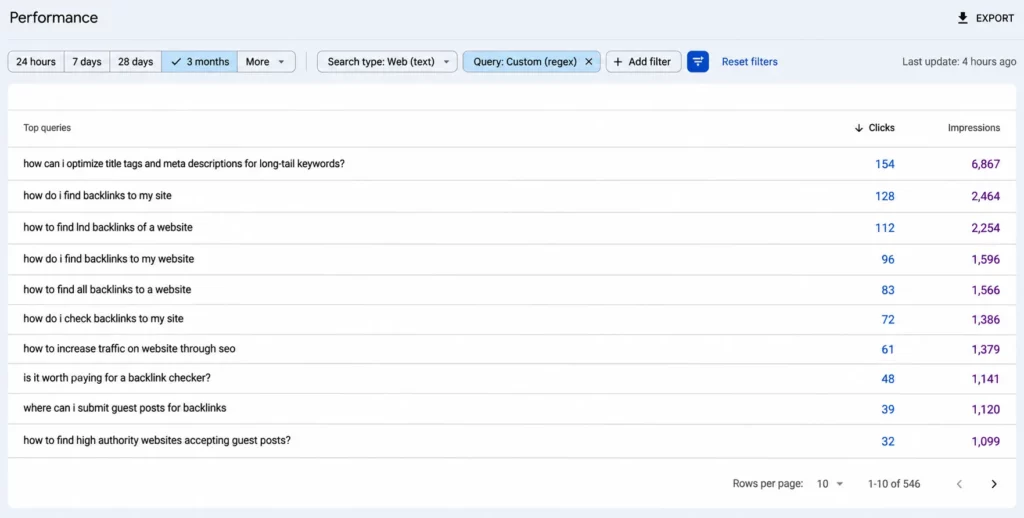
Google’s Performance report guide explains the available metrics, including impressions, clicks, CTR, and average position.
Sort candidate queries by impressions, then inspect clicks, position, and the relevant audience. Avoid an arbitrary rule that every query with zero clicks needs a new paragraph.
Ask:
- Does the query describe a problem our business can help solve?
- Is there enough repeated activity to justify investigation?
- Which page appears for it?
- Does that page serve the expected task?
- What evidence would justify changing it?
Use comparable countries and devices where they matter. For an international site, maintain consistent market groups with the Search Console country filter.
Why Low Clicks Alone Are Not a Diagnosis
Several explanations deserve investigation: the page may be poorly positioned, the visible result may not fit the task, demand may have changed, or the results page may answer the question before a visit.
These are hypotheses, not conclusions from the regex.
Inspect representative results with the appropriate language and market context. Record what you observe and recognize that another user may see something different.
If the existing page already answers the question well, consider whether any content change is justified at all.
Step 4: Map Each Useful Query to the Existing Page
Select a candidate query, then review the Pages dimension while keeping the query filter active.
Open the relevant page and read it as someone trying to complete that task.
A query appearing against a URL is a useful clue. It does not establish that the page ranks consistently in a prominent position or deserves a separate article.
Group related queries by the decision they describe. For example:
- Exporting invoices.
- Finding payment status in an export.
- Understanding plan restrictions on exports.
Those may belong to one coherent explanation.
Use a content audit to decide whether to improve the existing page, consolidate overlapping information, or create a genuinely distinct resource.
Do Not Create One URL Per Query Variation
If several searches ask the same underlying question, answer the shared need clearly.
Create a separate page when the task needs a distinct format, substantial procedure, or different audience. A new URL should have a purpose beyond matching another wording variation.
This avoids turning a useful research method into an unnecessary publishing queue.
Step 5: Add a Direct Answer Supported by Evidence
Consider this hypothetical candidate:
how can I export paid invoices to CSVSuppose the associated guide explains exporting invoices but never says how to identify paid records.
Before editing, ask the product team:
- Can users filter by payment status?
- Which subscription plans support the function?
- What does the CSV contain?
- Are there limitations the answer must explain?
The useful revision depends on those verified facts.
A possible structure is:
You can export paid invoices by selecting the paid-status filter before generating the CSV. This option is available on [verified plans]. The export includes [verified fields], with [verified limitations].
This is an editorial template with placeholders, not a claim about a real product. Replace every placeholder with confirmed information before publishing.
Then explain the procedure, show an accurate example where helpful, and link to the relevant supporting documentation.
Put the Answer Where the Reader Needs It
Use a descriptive heading within the section that addresses the task.
Keep a qualification close to the claim it limits. Do not promise a capability near the top and reveal an important exclusion several screens later.
There is no universal paragraph length that guarantees AI selection. The answer should be complete enough for the task and easy for a person to use.
Develop content AI cannot easily replicate through actual product knowledge, original demonstrations, and transparent limitations.
What Makes This a GEO Workflow?
The query review can reveal information needs that are also relevant to conversational search.
That makes it useful for generative engine optimization, but it does not convert ordinary Search Console rows into a prompt database.
Google’s current generative AI optimization guide emphasizes useful, original content and established SEO practices. It also cautions against producing separate pages for every possible query variation or rewriting purely for AI.
Treat the direct answer as a reader improvement. Citation visibility remains a separate outcome to observe.
For Google’s AI features, also check technical eligibility and the site’s inclusion settings in Search Console. A content edit cannot resolve an intentional exclusion.
Measure the Page Change and AI Visibility Separately
Before publishing, record the query group, associated page, period, filters, and proposed improvement.
After publishing, save the change date and review an appropriate comparable period. For a modest-volume site, a longer observation window may be more useful than daily checks.
Track the same query group and page. Also look at the page’s broader relevant queries so that a narrow filter does not hide a wider change.
Avoid claiming that the edit caused every subsequent movement. Positions, demand, competing content, and search interfaces can change at the same time.
Use the Appropriate AI Report
Google’s Generative AI performance report documentation describes impressions from supported AI Search experiences, with dimensions such as pages, countries, dates, and devices.
Use the available report for AI visibility rather than labeling regex-matched text queries as AI citations.
Where you conduct manual AI-answer checks, record the question, product, date, market, cited URL, and response accuracy. Keep those observations distinct from the Search Console dataset.
A useful report can say: “We improved this answer; these search metrics changed; these AI appearances were observed.” That is more precise than “the GEO hack worked” without defining success.
Know What the Filter Leaves Out
Google’s query-data guidance explains that anonymized queries are omitted for privacy and that the table does not contain every query.
Applying a query filter also excludes anonymized queries from the corresponding chart totals. Do not compare the filtered chart with the unfiltered total as if the difference represented only shorter queries.
An empty result does not establish that nobody asks longer questions about your topic.
Try a longer period or a lower threshold, confirm the report settings, and inspect your actual data availability.
Avoid uploading an export to another service without considering the information it contains and your organization’s data practices.
A Practical Weekly GEO Hack Routine
Choose a manageable review batch, such as five candidate queries. This is a suggested workload, not a ranking threshold.
For each candidate, write:
- The underlying reader task.
- The existing page.
- The confirmed information gap.
- The evidence needed.
- The smallest useful revision.
- The measurement plan.
Discard candidates that do not fit the business or reveal no useful change.
Give each approved revision an owner. Keep the initial observations so another editor can understand why the work was commissioned.
The repeatable advantage is a better decision process: observed demand leads to a verified improvement, followed by measurement.
Frequently Asked Questions
What is the Search Console GEO hack?
It is a workflow using query filters to find potential content improvements. The regex surfaces longer searches; manual review determines their relevance and the appropriate action.
Does the screenshot’s regex find seven-word queries?
No. The {7,} group plus the final term requires at least eight whitespace-separated terms.
Does it reveal ChatGPT prompts?
No. The Search results query table is not a record of private ChatGPT conversations.
Are all matching queries questions?
No. Long product searches and other phrases also match. Review meaning or use a separate question-starter filter.
Should I update every high-impression, low-click query?
No. Check the associated page, position, audience, and actual information gap before deciding on a change.
Will a direct answer guarantee an AI citation?
No. A clear, verified answer can improve the page’s usefulness. AI source selection and business outcomes still require observation.
Turn the Shortcut Into a Useful Content Decision
The filter is quick. The valuable work is deciding which question matters, verifying the answer, and improving the appropriate page.
Use this GEO hack to create a better editorial brief—not a promise of instant citations.
If you want technical fixes, evidence-led content improvements, and authority-building work to become a consistent monthly process, connect with Paul Gautheron on LinkedIn. Scale Xpert brings those activities into one visibility workflow, with progress reviewed against meaningful website outcomes.