
Google Search Console received three significant updates in early July 2026. The most impactful is the introduction of platform properties, which lets you connect and track your Instagram, TikTok, X, and YouTube accounts directly inside GSC to see how your social and video content performs in Google Search. Alongside this, Google updated its Merchant Listing structured data documentation to support product category formatting and automatic sale duration scheduling. A third development, the test of a “Visit Site” button on sponsored search ads, has implications for how organic results compete for clicks. This guide covers what each update does, how to set it up where applicable, and the specific SEO and content strategy actions each update makes possible.
If you want to discuss how these updates affect your specific workflow alongside other SEO practitioners, Scale Xpert’s Discord community is a good place to start. It is a community for SEO learning and genuine backlink exchange where recent updates are discussed as they happen.
What Google Search Console Platform Properties Actually Are
Google Search Console platform properties is the official name for the new feature that lets site owners verify and connect their social media and video accounts directly within GSC. As Barry Schwartz reported in Search Engine Land on July 7, 2026, Google now allows you to see how your content on Instagram, TikTok, X (formerly Twitter), and YouTube performs in Google Search, not just your owned website.
This is a meaningful expansion of what GSC has historically measured. Until this update, GSC could only report on properties you controlled at the domain level, which meant traditional websites and web apps. Platform properties extends this to third-party domains where you publish content but do not have standard GSC verification access.
Barry Schwartz’s own X account performance report, which he shared as a screenshot in his Search Engine Land article, showed the kind of data now available: search queries that drove users to his X profile, impression counts, and click data from those profile visits originating in Google Search. This is data that simply did not exist before in any GSC interface.
According to Google’s own announcement on the Search Central Blog, the goal of this feature is to let creators and businesses “easily track which search terms lead people to your Instagram, TikTok, X and YouTube content on Search, and see exactly how your audience is interacting with your posts.”
As Barry Schwartz noted in his Search Engine Roundtable video coverage of this update, some accounts may already see their social platform properties appearing in GSC automatically, particularly if those accounts were previously linked to a Search Profile. For others, manual verification is required.
How to Set Up Platform Properties in Google Search Console
Google Search Console Add Property Panel. Source: Google Developer
The setup process is straightforward but requires access to each platform’s account through its standard authentication process.
Open Google Search Console at search.google.com/search-console. Click the property selector dropdown at the top left of the interface, which shows your currently active property. Select “Add property” from the dropdown menu.
In the property type selection screen, you will see the standard URL prefix and domain options alongside the new platform property options. Select one of the four available platforms: Instagram, TikTok, X, or YouTube. Each platform requires separate verification.
Following the on-screen prompts authorizes Google to access your account data through each platform’s authentication. The verification steps vary slightly by platform but generally involve logging into the social account and granting GSC read access. No posting permission or account modification access is required.
After verification, the platform property appears in your GSC property selector alongside your website properties. Switching to a platform property shows a dedicated performance report, insights report, and achievements section for that social account’s performance in Google Search.
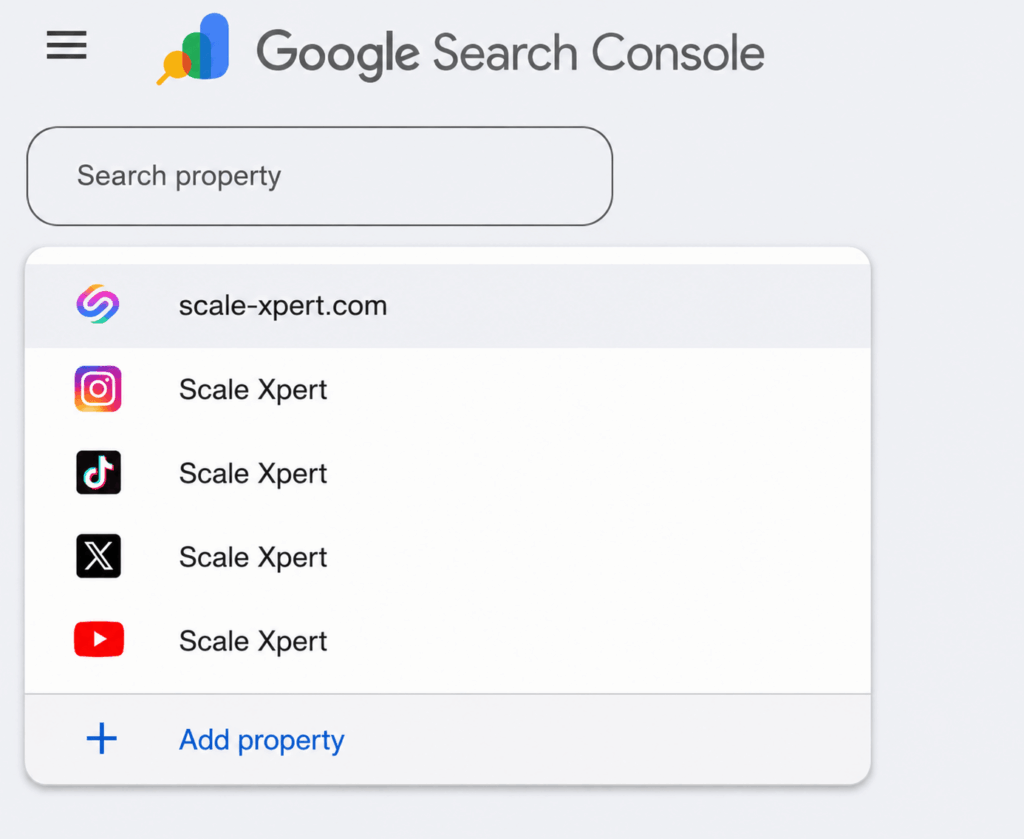
Google Search Console property dropdown with Scale Xpert website and social media properties
Google noted that the rollout is gradual. If you do not see the platform property options in your GSC interface yet, the feature may not have reached your account. Check back over the coming weeks as the rollout progresses.
The Three Data Views Available for Platform Properties
Each connected platform property provides three reporting sections within GSC, each serving a different analytical purpose.
The Performance Report for platform properties functions similarly to the standard GSC Performance Report for websites. It shows total clicks, total impressions, and additional metrics for your social content appearing in Google Search. Critically, it allows you to filter and sort by specific posts and by the queries that are driving the most traffic to your social profiles and content.
This query-level data is the most actionable element for SEO practitioners. Seeing which search queries lead users to your Instagram profile, for example, reveals search intent categories your brand is ranking for through social presence that your website may not be capturing. If your X account is generating impressions for queries you had not previously optimized your web content for, those queries are worth investigating as content opportunities.
The Insights Report provides a higher-level overview of traffic trends, top-performing posts, and how people discover your accounts on Google. This report is more useful for understanding macro patterns: which categories of social content drive the most Google-originated traffic and how that pattern is shifting over time.
The Achievements section tracks milestones like reaching new click thresholds from Google Search in a rolling 28-day window. This is primarily a motivation and reporting tool rather than an analytical one, but it provides a consistent benchmark for measuring whether your social search optimization is progressing.
What This Data Tells You That You Could Not Know Before
The strategic value of platform properties goes beyond simply having another dashboard to check. The data it surfaces reveals search behaviors that were previously invisible to practitioners without this feature.
Before platform properties, if someone found your TikTok video through a Google Search and then visited your website from TikTok’s bio link, your analytics would show that visit as social referral traffic from TikTok, completely erasing the Google Search origin from the attribution chain. Platform properties reveals the Google Search queries that are driving that first touchpoint, making the full search-to-social-to-website journey visible for the first time.
This has direct implications for how you evaluate social content performance. A TikTok video that generates 50,000 views may produce little Google-originated traffic if its discoverability in Google Search is low. A less-viewed video that targets a specific question or topic may generate significant Google Search impressions and clicks to your profile, making it far more valuable for organic discovery than raw view counts suggest.
For brands and creators who post consistently across platforms, this data reveals which platforms are performing best as Google Search entry points and which content topics are generating the most search-visible social content. These insights directly inform which platforms deserve more investment and which content angles have search demand beyond the native platform algorithm.
SEO Strategy Implications: Social Content as a Search Visibility Surface
The introduction of platform properties is not just a reporting feature. It represents Google’s formal acknowledgment that social and video content is a meaningful search visibility surface alongside traditional web pages, and that publishers deserve measurement tools for that surface.
For SEO practitioners, this creates a clear framework expansion. The practice of optimizing social content for searchability, including using specific keywords in video titles, captions, and descriptions, is now measurable through the same tool you use to measure your website’s organic performance.
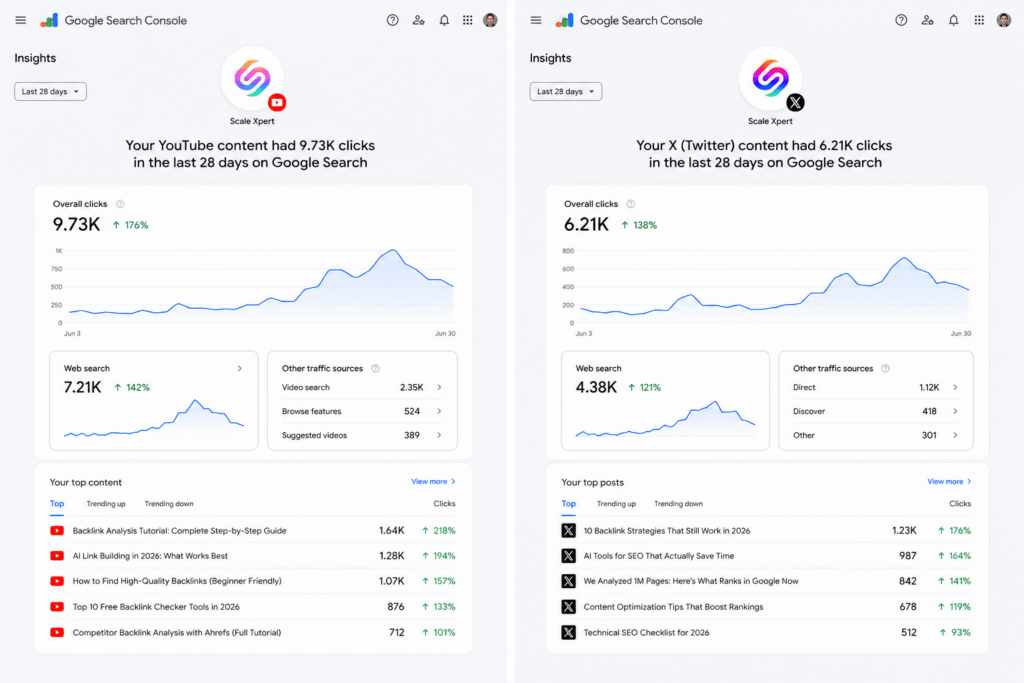
Google Search Console insights dashboard showing Scale Xpert YouTube and X content performance with clicks, web search data, and top content results.
Several specific optimization behaviors become worth investing in once you can measure their impact. YouTube video titles optimized for how users would search for that topic in Google Search, not just how they would search within YouTube, now have measurable Google Search performance data to validate or refute the optimization. Instagram post captions that include specific location or topic keywords relevant to Google searches have impressions data to show whether those keywords are connecting with Google Search users.
This connects directly to what Grok’s X integration demonstrated about social content as an AI citation surface. When Grok cites X posts in its responses, those posts are becoming AI-visible content. When Google Search displays social content prominently enough to generate clicks, that content is building search visibility for the brand or creator beyond their website. Platform properties now gives you the data to measure and optimize for both.
Understanding how Grok AI selects sources using X and web search in real time is relevant context here, because the social content visibility that GSC platform properties measures overlaps with the social content visibility that Grok cites in its AI responses.
Tips and Tricks for Getting the Most from Platform Properties Data
Once platform properties is available in your GSC, several specific analytical practices extract maximum value from the new data.
Cross-reference platform property queries with your website’s Performance Report queries. Look for search queries generating high impressions on your social platform properties that are not generating proportional impressions for your website. These are queries where your social content is ranking but your website is not competing, representing either content gaps on your website or opportunities to strengthen social content that is already getting traction.
Identify your top-performing social posts by Google Search clicks and reverse-engineer why they work. Posts generating the most Google Search clicks likely share characteristics: topic focus, keyword presence in titles or captions, specific content format, or recency relative to trending searches. Those characteristics inform what future social content should look like to maintain or improve Google Search visibility.
Track impressions for social content in the context of your overall search visibility. If your website organic impressions are declining while your social platform property impressions are increasing, you are experiencing a traffic channel shift that traditional website analytics would not reveal. Platform properties makes that shift visible, allowing you to make informed decisions about whether to double down on social content or focus on recovering website organic performance.
Use the Insights Report to identify content discovery patterns by platform. If your YouTube channel generates most of its Google Search traffic from long-form educational content while your Instagram generates most of its search traffic from location-specific content, those patterns reveal how each platform’s search visibility profile differs and should inform your platform-specific content strategy.
Compare click-through rates across platform properties. A high impression count with a low click rate on a social profile suggests your content is appearing in search results but not compelling users to click through. For social profiles, this often means your profile description, bio, or visible content snippet in search results is not aligned with the search intent of the users finding you.
Understanding how the complete GSC features and reports work together helps you integrate platform property data into your existing GSC workflow rather than treating it as a separate analytical effort.
Social Content Optimization for Google Search: Actionable Tactics
Now that you can measure the Google Search performance of your social content, these specific optimization approaches have data validation available that they previously lacked.
Treat YouTube video titles as search queries, not attention hooks. YouTube titles optimized purely for click-through within YouTube often sacrifice the keyword specificity that makes them discoverable in Google Search. With platform properties data showing you which queries are driving Google-originated traffic to your videos, you can test whether more search-oriented titles affect your Google impressions without simply copying standard keyword optimization advice.
Use the first line of Instagram and TikTok captions for keyword context, not engagement bait. Google Search often displays the first portion of a social post’s text in its search snippets for social content. Opening captions with specific, search-relevant context rather than generic engagement prompts makes your social content more likely to appear for relevant queries and more likely to earn clicks when it does appear.
Align social content topics with queries where your social profile has existing impressions. If your platform property data shows existing impressions for specific query categories, creating more content that targets those same query categories builds on established search visibility rather than starting from zero.
Optimize your social profile descriptions as search landing pages, not social bios. For users arriving from Google Search, your social profile description is the first thing they read after clicking from a search result. Profile descriptions that clearly communicate what your account covers, in the language your target audience would use to search for that content, convert more impressions into profile visits and follows.
Post social content about topics where you have strong GSC website performance and where there is a natural social angle. The combination of website content that ranks for a query and social content about the same topic creates multiple Google Search touchpoints for the same user intent, increasing your overall visibility for that query category.
The Merchant Listing Update: What Changed for E-Commerce SEO
Alongside the platform properties launch, Google updated its Merchant Listing structured data documentation with two functional additions that align website product data with Google Merchant Center feed formatting.
The product category property update adds support for both text format and product category code format in the productCategory property of Merchant Listing schema. Previously, the property primarily accepted text descriptions. Now it also accepts the standardized category codes used in Google Merchant Center product feeds, allowing merchants to use consistent categorization between their website’s structured data and their Merchant Center product listings. This reduces discrepancies between the two data sources that can cause product visibility inconsistencies in Google Shopping.
The sale duration update introduces support for scheduling discount prices with specific start and end dates directly within structured data. Merchants can now declare a promotional price alongside the dates when that price is active, and Google’s systems will automatically display the promotional price during the active window and revert to the standard price outside it. This eliminates the manual price management that previously required merchants to update their website schema at the exact start and end of sales.
The practical benefit for e-commerce sites is accuracy and automation. Product rich results in Google Search that display pricing have historically been a reliability concern because website prices and Merchant Center prices can fall out of sync. These updates reduce that synchronization burden by giving merchants structured data tools that align more closely with how Merchant Center already manages product and pricing data.
For site owners running structured data implementations for e-commerce, these updates are worth reviewing against your current productCategory and offer pricing properties to determine whether adopting the new formats improves your product listing accuracy in Google Search results.
Connecting merchant listing schema with a broader schema markup implementation strategy helps you see these specific updates in the context of your overall structured data approach.
The Visit Site Button Test: What It Means for Organic Competition
The third notable development from this period is Google’s test of a “Visit Site” button appearing on the right side of sponsored search ads, as Barry Schwartz documented in his Search Engine Roundtable video coverage. This button provides an explicit, visually prominent call-to-action on paid search results.
The SEO implication is indirect but worth tracking. If the “Visit Site” button test increases the click-through rate on paid search ads, organic listings directly below those ads will compete with a more aggressively designed paid unit. Higher CTR on ads means more clicks that might otherwise have gone to organic results are captured at the paid level.
However, the test may also be a signal about how Google is thinking about CTR optimization more broadly. If explicit CTAs improve ad performance, applying similar design thinking to organic result snippets, through better meta descriptions and structured data that creates rich, action-oriented results, becomes more important for maintaining competitive CTR against more prominent paid units.
Practitioners monitoring their organic CTR metrics in the Performance Report over the coming months should note whether periods of the Visit Site button test correlate with any CTR changes for high-commercial-intent queries where paid and organic results compete closely.
How Platform Properties Connects to AI Citation Strategy
The most forward-looking implication of GSC platform properties is what it reveals about Google’s evolving understanding of content and search visibility. By formally recognizing social and video content as search properties worth measuring and reporting on, Google is acknowledging that a creator’s search presence extends far beyond their owned website.
From an AI citation perspective, this alignment is significant. Google’s AI Overviews and AI Mode draw from the same indexed content that GSC’s platform properties now measures. Social content that generates Google Search impressions is indexed content that AI systems can potentially retrieve and cite. The same YouTube video that generates search traffic through platform properties data is the same YouTube video that Gemini can cite through its YouTube integration.
This creates a unified visibility framework where optimizing social content for Google Search discoverability, measured through platform properties, simultaneously improves its potential as an AI citation source. A well-optimized YouTube video that answers a specific question clearly, that generates search impressions in GSC’s platform properties, is also a Gemini-citable content asset.
Understanding how the Google Search Console AI Performance Report measures your AI search visibility alongside how platform properties measures your social search visibility gives you the complete picture of how all your content, web and social, performs across traditional and AI search simultaneously.
Frequently Asked Questions
What are Google Search Console platform properties?
Platform properties is a new feature in Google Search Console that allows site owners to verify and connect their social media and video accounts (Instagram, TikTok, X, and YouTube) to GSC. Once connected, you can see performance data including clicks, impressions, and search queries driving traffic to your social content from Google Search, in the same tool you use to measure your website’s organic performance.
Which platforms does GSC platform properties support?
As of the July 2026 launch, Google Search Console platform properties supports Instagram, TikTok, X (formerly Twitter), and YouTube. The feature launched with a gradual rollout, so availability varies by account. Additional platforms may be added in future updates.
Open GSC and click the property selector dropdown at the top left. Select “Add property.” Choose one of the four supported platforms from the property type options. Follow the on-screen verification steps to authorize the connection through each platform’s authentication. Each platform is added and verified separately.
Will Google Search Console show data for my individual posts or just my profile?
The platform properties performance report shows data at both the post level and the profile level. You can filter and sort to see which specific posts are driving the most search traffic and which search queries are generating impressions. This post-level data is what makes the feature actionable for content optimization rather than just awareness.
No. Adding platform properties is a reporting feature, not a ranking factor. It gives you visibility into how your social content performs in Google Search but does not change how your website or social accounts rank. The value is analytical, allowing you to understand and optimize the relationship between your social content and Google Search visibility.
What is the Merchant Listing structured data update about?
Google updated its Merchant Listing schema documentation to support product category codes (in addition to text descriptions) and to allow merchants to declare sale start and end dates directly in structured data. These updates align website product schema more closely with Google Merchant Center feed formatting and automate promotional price display without requiring manual schema updates at the start and end of sales.
Google is testing an explicit “Visit Site” call-to-action button on sponsored search results, likely to improve paid ad CTR by making the action more visually prominent. This is a paid advertising development that does not directly affect organic rankings. The indirect implication is that stronger paid ad CTR may reduce the clicks that reach organic results on commercial queries, making organic CTR optimization more important.
How does GSC platform properties data connect to AI search strategy?
Social content that generates Google Search impressions (visible in GSC platform properties) is indexed content that AI systems including Gemini can retrieve and cite. A YouTube video that performs well in Google Search is also a potential Gemini citation through Gemini’s YouTube integration. Platform properties data therefore reveals which social content has both Google Search visibility and potential AI citation eligibility, making it a useful signal for your broader multi-surface visibility strategy.
Conclusion
Google Search Console’s July 2026 updates collectively expand the measurement tools available to SEO practitioners into social and video content that has always influenced organic search presence but has never been measurable within GSC itself. Platform properties is the headline feature: it makes the previously invisible connection between social content and Google Search traffic visible and actionable. The Merchant Listing updates provide e-commerce sites with better structured data alignment tools. And the Visit Site button test signals ongoing pressure on organic CTR from more aggressively designed paid results. The practitioners who will benefit most from these updates are those who take the time to set up platform properties for each relevant social account, analyze the query and post-level data to identify optimization opportunities, and use those insights to make their social content systematically more discoverable in Google Search.
If you want to compare your platform properties data analysis with other practitioners and discuss the strategic implications of these updates, Scale Xpert on Discord is where those conversations are happening.




