
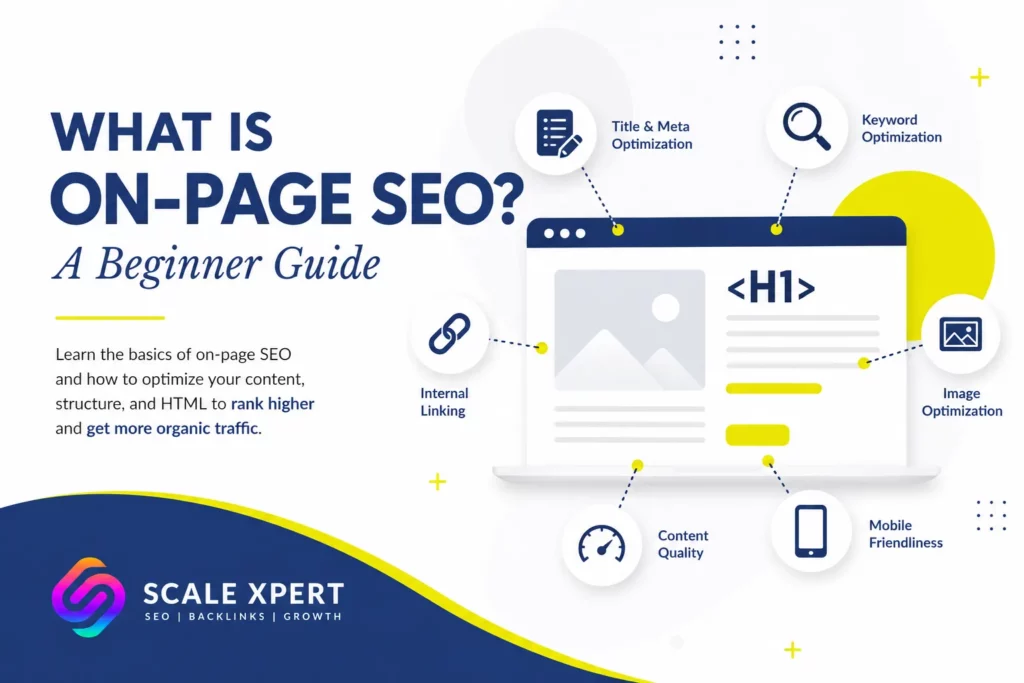
If you are learning search optimization, you may be asking, what is on-page SEO, and how does it help a website rank? It is the process of improving the content, structure, and visible elements of a web page so search engines and users can understand it easily.
However, it involves more than placing keywords in titles. It also includes search intent, headings, internal links, images, URLs, readability, and page experience.
For practical feedback while using this guide, you can join SEO discussion community and compare ideas with other website owners.
What Does On-Page SEO Mean?
To understand what is on-page SEO, think about everything you can directly edit on a page. This includes the title tag, H1, written content, images, internal links, URL, and layout.
Search engines use these signals to identify the topic, while readers use them to judge whether the page answers their question.
Therefore, strong on-page optimization helps both audiences understand the page more clearly.
Why On-Page SEO Matters
A technically crawlable page can still perform poorly when its purpose is unclear or its content does not match search intent. For that reason, understanding what is on-page SEO is important before focusing heavily on backlinks.
Good optimization can help you:
- Match content with the correct search intent
- Improve relevance for target searches
- Make information easier to scan
- Guide visitors to related resources
- Support crawling through internal links
- Encourage more clicks from search results
In addition, well-organized pages are easier to review and update later.
The 12 Essential On-Page SEO Elements
The best way to explain what is on-page SEO is to examine the elements that work together on each page.
1. Search Intent
First, determine what the searcher expects. A query may have informational, commercial, transactional, or navigational intent.
For example, “what is on-page SEO” requires an educational guide rather than a sales page. Read this search intent guide to understand how content format should match a query.
2. Title Tag
The title tag may appear as the search-result headline. Describe the topic clearly, use the primary keyword naturally, and give people a useful reason to click.
However, avoid forcing several similar phrases into one title.
3. Meta Description
A meta description summarizes the page for potential visitors. Clear wording can create a more useful search snippet and improve click potential.
Briefly explain what readers will learn rather than filling the description with keywords.
4. SEO-Friendly URL
Use a short, descriptive URL without unnecessary numbers, dates, or filler words.
For this article, /what-is-on-page-seo/ remains suitable. Therefore, changing the existing slug is unnecessary.
5. H1 Heading
Use one H1 that clearly communicates the page’s topic and benefit. It can differ slightly from the SEO title to reduce repetition.
For example, the title can focus on clicks while the H1 focuses on the complete guide.
6. H2 and H3 Headings
Headings divide content into logical sections and make the article easier to scan.
Use descriptive wording instead of repeating what is on-page SEO in most subheadings. Each heading should tell readers what they will learn next.
7. Helpful Main Content
Content should answer the main question, cover supporting topics, and provide practical next steps.
Moreover, every section should add something new. Repeating the definition in different words does not make a page more complete.
8. Natural Keyword Coverage
Use the primary phrase in important locations, but support it with related terms such as:
- on-page optimization
- title tags
- header tags
- content optimization
- internal linking
- image SEO
- organic rankings
- user experience
- search relevance
- content structure
Therefore, learning what is on-page SEO also means understanding how to cover a topic without keyword stuffing.
9. Internal Links
Internal links connect related pages and help search engines understand your site structure. They also guide readers toward useful next steps.
Use descriptive anchors. For example, link to a guide about increasing organic website traffic instead of using vague wording such as “click here.”
Internal links can also distribute authority between relevant pages. This makes them useful for both navigation and content discovery.
10. External Links
Use trustworthy external links when they help readers verify definitions, research, data, or important claims.
However, do not add external links only to make the article appear researched. Every source should serve a clear purpose.
11. Image Optimization
Compress images, use descriptive file names, and write accessible alt text without keyword stuffing.
In addition, each image should support the surrounding section. Decorative images should not distract readers or slow down the page unnecessarily.
12. Page Experience and Technical Checks
The page should work properly on mobile devices, load efficiently, use HTTPS, and remain accessible to search engines.
Before rewriting, inspect the URL in Google Search Console. Confirm that it is indexable, review the selected canonical URL, and check for crawling or rendering problems.
A Complete Before-and-After Example
Suppose a beginner keyword-research page has the following setup.
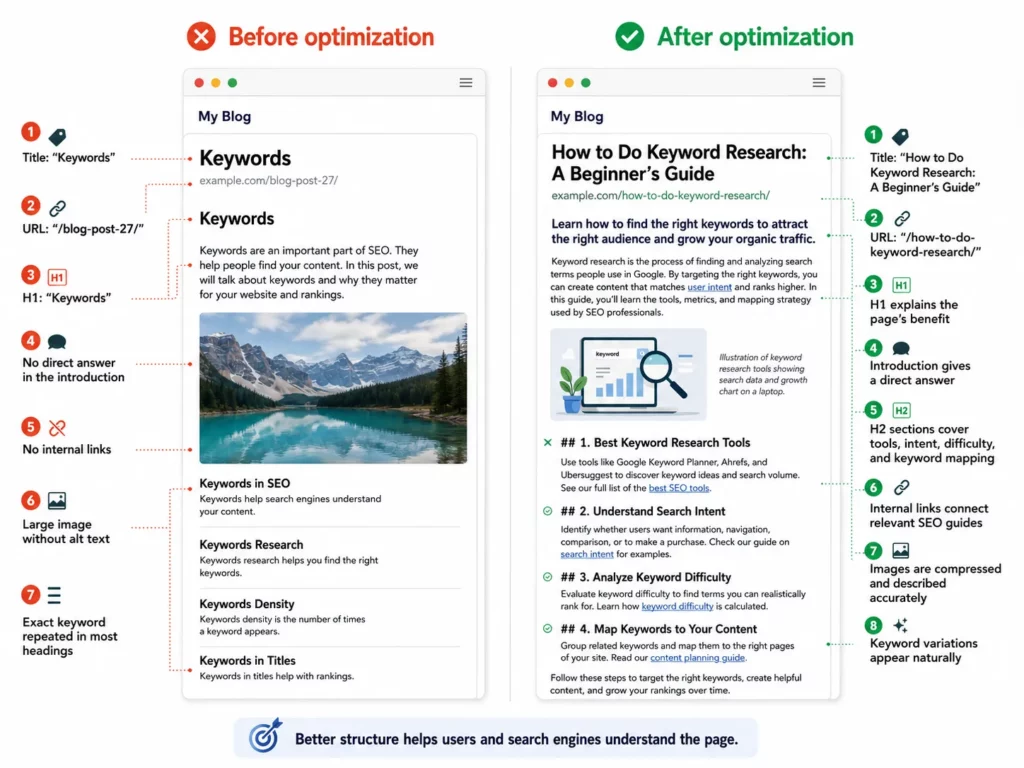
Turn a weak page into a clear, useful, and SEO-friendly resource.
The improved version gives users a clearer learning path. More importantly, it gives search engines additional context beyond one repeated keyword.
On-Page SEO vs Off-Page SEO
Another way to understand what is on-page SEO is to compare it with off-page SEO.
On-page work covers changes made directly to your website, including content, titles, headings, images, URLs, and internal links. In contrast, off-page SEO focuses on external signals, especially backlinks, mentions, and authority.
Both support organic growth. However, external authority cannot fully compensate for thin content, confusing headings, or poor search-intent alignment.
Beginner On-Page SEO Checklist
Use this checklist before publishing or updating a page:
- Confirm that the URL is indexable.
- Check the canonical URL in Search Console.
- Identify the primary search intent.
- Write one clear H1.
- Create a concise title and meta description.
- Use a short, descriptive URL.
- Answer the main question near the beginning.
- Organize sections with H2 and H3 headings.
- Use the target keyword and related terms naturally.
- Add specific internal-link anchors.
- Optimize image sizes, file names, and alt text.
- Review the page on mobile.
- Remove repetitive or unclear wording.
- Request indexing after major updates.
- Monitor clicks, impressions, queries, and position for several weeks.
You can also learn how to find high-impression, low-click pages in Google Search Console when choosing which content to improve first.
FAQs
What is on-page SEO in simple terms?
It means improving page elements you control so search engines and visitors can understand the content more easily. When beginners ask what is on-page SEO, the answer usually includes content, headings, titles, links, images, and URLs.
What is on-page SEO used for?
It is used to improve search relevance, readability, crawlability, and user experience. Therefore, it can help a page compete for suitable organic searches.
What are the most important on-page elements?
Key elements include search intent, content quality, titles, headings, internal links, images, URLs, and page experience. However, no individual element guarantees better rankings on its own.
How often should I use my target keyword?
There is no universal number that guarantees rankings. Use the phrase in important locations and only where it sounds natural. Although people researching what is on-page SEO expect to see that phrase, excessive repetition can make the article uncomfortable to read.
Is on-page SEO the same as technical SEO?
No. On-page optimization mainly covers individual page content and structure. Technical SEO covers broader issues such as crawling, indexing, rendering, site speed, and website architecture.
Is on-page SEO enough to rank?
Not always. Rankings may also depend on technical health, website authority, backlinks, competition, content quality, and time. Nevertheless, weak page optimization can reduce the value of those other efforts.
How long do on-page improvements take to work?
Google must recrawl and reassess the page. As a result, meaningful changes in queries, positions, and traffic may take several weeks or longer.
Should I update the existing page or publish a new one?
Update the existing URL when it already matches the topic and has impressions, links, or ranking history. Create a new page only when the target topic or search intent is clearly different.
Conclusion
Understanding what is on-page SEO is only the beginning. The real value comes from matching search intent, improving headings, creating useful content, adding descriptive internal links, optimizing images, and checking indexability.
Therefore, treat each page as a complete search experience rather than a container for keywords. After publishing the update, request indexing and monitor its Google Search Console performance for at least several weeks.
For feedback on your optimization work, you can join the SEO community conversation, share the changes you made, and learn from other website owners.




