
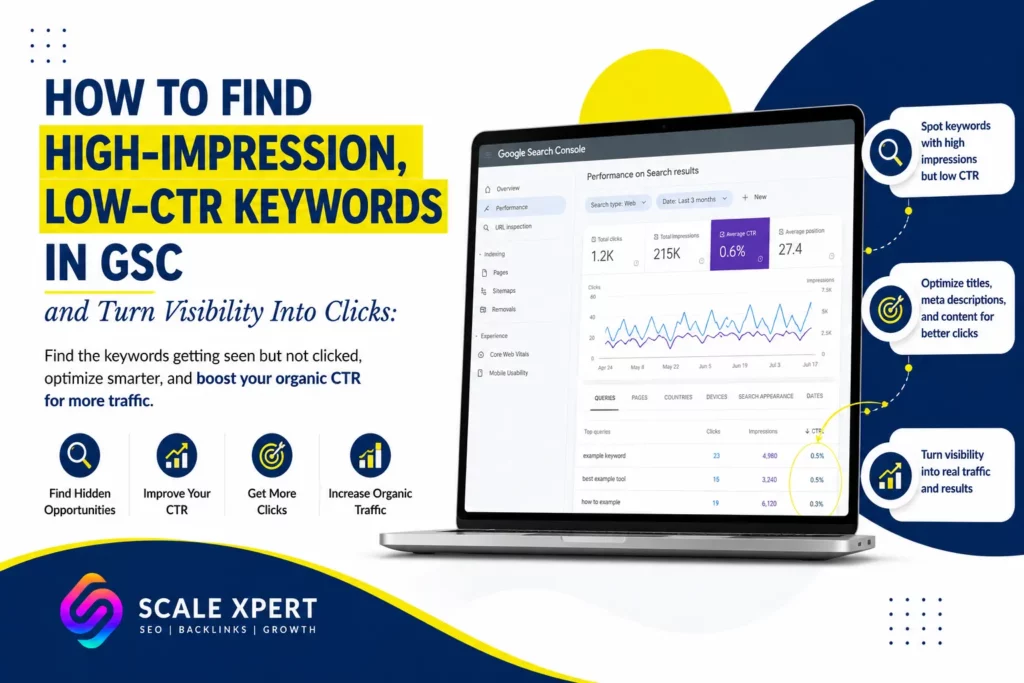
A keyword can generate thousands of impressions without bringing meaningful traffic to your website. Google may already consider your page relevant, but users are still choosing other results.
Finding high-impression, low-CTR keywords in GSC helps you identify these missed opportunities. Instead of guessing which pages need improvement, you can use real search data to find queries that already have visibility but produce too few clicks.
However, low CTR does not always mean your title is weak. The page may rank too low, target the wrong search intent, or compete with AI Overviews and other search features. Therefore, proper diagnosis should come before optimization.
Need help understanding your Search Console data? Join the Scale Xpert Discord community to discuss organic CTR, keyword opportunities, content improvements, and practical SEO strategies.
What Are High-Impression, Low-CTR Keywords?
High-impression, low-CTR keywords are search queries that frequently trigger your website in Google Search but produce relatively few clicks.
Organic click-through rate is calculated using this formula:
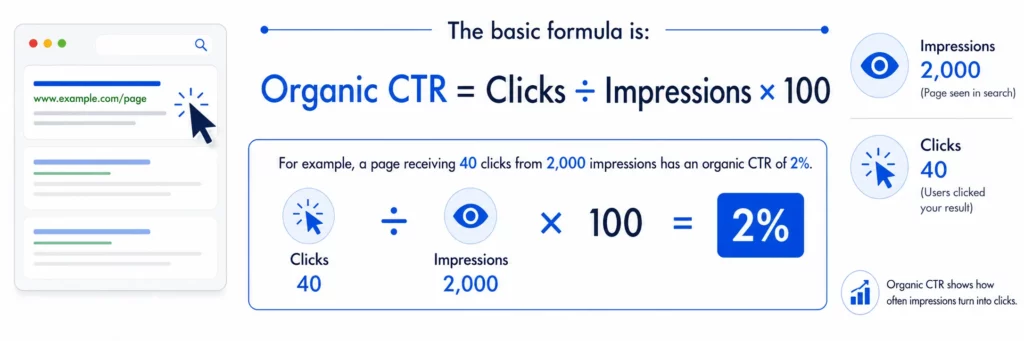
Therefore, you must always review:
- Impressions
- Clicks
- CTR
- Average position
- Search intent
- Device and country
- Search-result features
This context helps you determine whether you have a CTR problem, a ranking problem, or both.
Why These Keywords Are Valuable
A keyword with no impressions may need new content, better indexing, or stronger relevance. In contrast, a high-impression keyword already shows that Google understands some connection between the query and your page.
That existing visibility creates an opportunity.
By optimizing the correct queries, you may be able to:
- Increase organic clicks
- Improve keyword targeting
- Strengthen page-one rankings
- Update weak title tags
- Match search intent more closely
- Discover missing content sections
- Build better internal links
These keywords can also reveal topics your audience cares about but your content does not yet address clearly.
For a broader explanation of low-click pages, read Why Is My Website Getting Impressions but No Clicks?.
How to Find High-Impression, Low-CTR Keywords in GSC
Google Search Console provides four important metrics for this analysis: total clicks, total impressions, average CTR, and average position.
Follow this process to uncover your strongest opportunities.
Step 1: Open the Search Results Report
Log in to Google Search Console and select the correct website property.
Next:
- Open Performance.
- Select Search results.
- Choose a date range.
- Activate all four main metrics.
A three-month period is often useful because it provides enough data without relying too heavily on old performance. However, websites with seasonal traffic may need a year-over-year comparison.
Step 2: Open the Queries Tab
Scroll below the graph and select Queries.
The table shows the searches that triggered your website in Google. Sort the data by impressions from highest to lowest.
At this stage, do not assume that every high-impression query is worth targeting. Some searches may be irrelevant, too broad, or connected to a page that does not match the user’s goal.
Step 3: Export the Data
Exporting the report makes it easier to filter and compare keywords.
You can send the data to:
- Google Sheets
- Microsoft Excel
- CSV
- Looker Studio
Create filters for impressions, CTR, clicks, and position. For example, you could begin with keywords that have:
- More than 500 impressions
- CTR below 1%
- Average position between 1 and 20
- Clear relevance to your website
These numbers are starting points rather than fixed rules. Adjust them based on your website size and average search visibility.
Focus on Keywords With Real Improvement Potential
Not every low-CTR keyword deserves immediate attention.
A query ranking in position 70 may have thousands of impressions but little chance of producing clicks without major ranking improvements. Therefore, start with keywords already close to the first page or ranking within the top results.
Positions 1 to 5
A low CTR in this range may indicate:
- A weak SEO title
- An unclear page benefit
- Search intent mismatch
- Stronger competitor snippets
- Low brand recognition
- AI Overviews or featured snippets
These keywords are often strong candidates for title and snippet optimization.
Positions 6 to 20
Keywords in this range may need both ranking and CTR improvements.
You should review the title, but also examine content depth, internal links, backlinks, and topical relevance.
Positions Below 20
Treat these mainly as ranking opportunities.
A new title may improve presentation slightly, but the page is probably not visible enough to generate consistent clicks. Focus on content quality and authority first.
Match Each Keyword to the Correct Page
Once you identify a promising keyword, click it inside GSC. Then open the Pages tab.
This shows which page Google displays for that query.
Check whether the selected page is the best possible result. Sometimes Google ranks:
- A category page instead of an article
- An outdated post instead of a newer guide
- A commercial page for an informational query
- Multiple pages targeting the same keyword
- A broad guide for a highly specific search
If the wrong URL appears, you may have a search intent or keyword cannibalization problem.
Review search intent guide to determine whether users want information, comparison, navigation, or a transaction.
Compare the Search Query With Your Title
Your title should closely reflect what users expect from the query.
For example, suppose your page appears for:
how to find low CTR keywords in Search Console
A vague title such as Google Search Console Tips does not clearly promise the answer.
A stronger title would be:
How to Find High-Impression, Low-CTR Keywords in GSC
The improved version mirrors the user’s problem and communicates the page’s purpose immediately.
However, do not stuff several keyword variations into one title. Keep it readable, specific, and accurate.
Check the Actual Search Results
Search the keyword manually before changing the page.
Look at:
- Competing titles
- Featured snippets
- AI Overviews
- Videos
- People Also Ask results
- Forum discussions
- Publication dates
- Rich results
The search-result layout can significantly affect organic CTR.
For example, a keyword may appear to have poor performance because an AI Overview answers the basic question before users reach traditional results. In that case, a simple title change may not be enough.
Add value that search features cannot fully summarize, such as:
- Screenshots
- Templates
- Original research
- Step-by-step workflows
- Real examples
- Downloadable checklists
- Comparison tables
Improve the Content Around the Keyword
High-impression, low-CTR keywords in GSC can also reveal content gaps.
Review whether the page:
- Mentions the query clearly
- Answers it near the beginning
- Includes a relevant heading
- Provides enough supporting detail
- Matches the expected content format
- Uses current information
- Includes practical examples
If a keyword has strong relevance but the page covers it only briefly, add a dedicated section.
However, avoid forcing every query into an H2. Group closely related searches together and build a useful topic structure.
Strengthen Internal Links
Internal links help search engines understand which pages are important and how different topics connect.
Link to the page from relevant articles using descriptive anchor text. For example, use “find low-CTR keywords in Search Console” rather than “read more.”
In addition, link from the optimized page to supporting content. Readers who want a broader process can explore How to Improve Organic CTR Using Google Search Console.
If the page needs wider traffic improvements, link to How to Increase Traffic on a Website.
Compare Device, Country, and Date Data
A keyword’s overall CTR may hide important differences.
For example, it may perform well on desktop but poorly on mobile. Similarly, impressions from countries outside your target market can reduce the average CTR.
Use GSC filters to compare:
- Mobile and desktop
- Target country and all countries
- Last 28 days and previous 28 days
- Branded and non-branded searches
- New and established pages
This helps you avoid changing a title that already performs well for your intended audience.
Track Changes Carefully
Record the date whenever you update:
- The SEO title
- The meta description
- The introduction
- Main headings
- Internal links
- Content sections
Then monitor the keyword over several weeks.
Track changes in:
- Clicks
- Impressions
- CTR
- Average position
- Conversions
Avoid changing everything at the same time. Smaller updates make it easier to identify which improvement produced the result.
Common Mistakes to Avoid
When analyzing high-impression, low-CTR keywords in GSC, avoid:
- Judging CTR without checking position
- Optimizing irrelevant queries
- Rewriting every title at once
- Ignoring search intent
- Comparing unrelated pages
- Using one universal CTR benchmark
- Forgetting mobile and country filters
- Expecting immediate results
- Adding keywords unnaturally
Most importantly, do not treat impressions as guaranteed visibility. A result can receive an impression without appearing where users are likely to click.
FAQs
What is Considered a High-Impression Keyword?
There is no fixed number. A small website may consider 200 impressions significant, while a large website may focus only on queries with thousands of impressions.
What is a Low Organic CTR?
Low CTR depends on ranking position, query type, device, country, and search-result layout. Compare the keyword with similar queries rather than using one universal benchmark.
Which Keywords Should I Optimize First?
Start with relevant keywords that have high impressions, low clicks, and positions close to page one. These usually offer the strongest short-term potential.
Can a Better Title Improve CTR?
Yes, especially when the page already ranks in a visible position. However, title optimization will not solve a page that ranks too low.
Should I Optimize Keywords Ranking Below Position 20?
You can, but prioritize ranking improvements first. Strengthen content, internal links, and backlinks before focusing heavily on CTR.
Why Does Google Show a Different Page for My Keyword?
Google may consider another page more relevant. This can happen because of weak targeting, duplicate topics, internal linking, or keyword cannibalization.
How Often Should I Review GSC Keywords?
A monthly review works for most websites. Larger sites or active publishing teams may review priority keywords every week.
Conclusion
Finding high-impression, low-CTR keywords in GSC gives you a practical way to turn existing search visibility into more organic traffic.
Start by reviewing queries, impressions, CTR, and average position. Then match each keyword to its ranking page, check search intent, compare competitor titles, and inspect the actual search results.
Improve titles and snippets when the page already ranks prominently. However, focus on content quality, internal links, and authority when ranking position is the main issue.
By diagnosing each keyword before making changes, you can avoid unnecessary edits and concentrate on opportunities with genuine traffic potential.
Want help identifying your strongest GSC opportunities? Join the Scale Xpert Discord community to discuss keyword data, CTR improvements, internal linking, and practical SEO strategies.




