
Your website is appearing in Google Search, but almost nobody is visiting it. This usually means Google considers your page relevant enough to display, but its ranking position, search intent, snippet, or search environment is not strong enough to earn the click.
However, a website getting impressions but no clicks is not always suffering from the same problem. Changing the title may help one page, while another page needs better content, internal links, backlinks, or a completely different keyword target.
This guide explains how to identify the real cause before rewriting everything.
Need another opinion on an underperforming page? Join the Scale Xpert community in Discord to discuss Search Console data, content issues, backlinks, and practical SEO fixes.
Quick Answer
If your website gets impressions but no clicks, check its average position first.
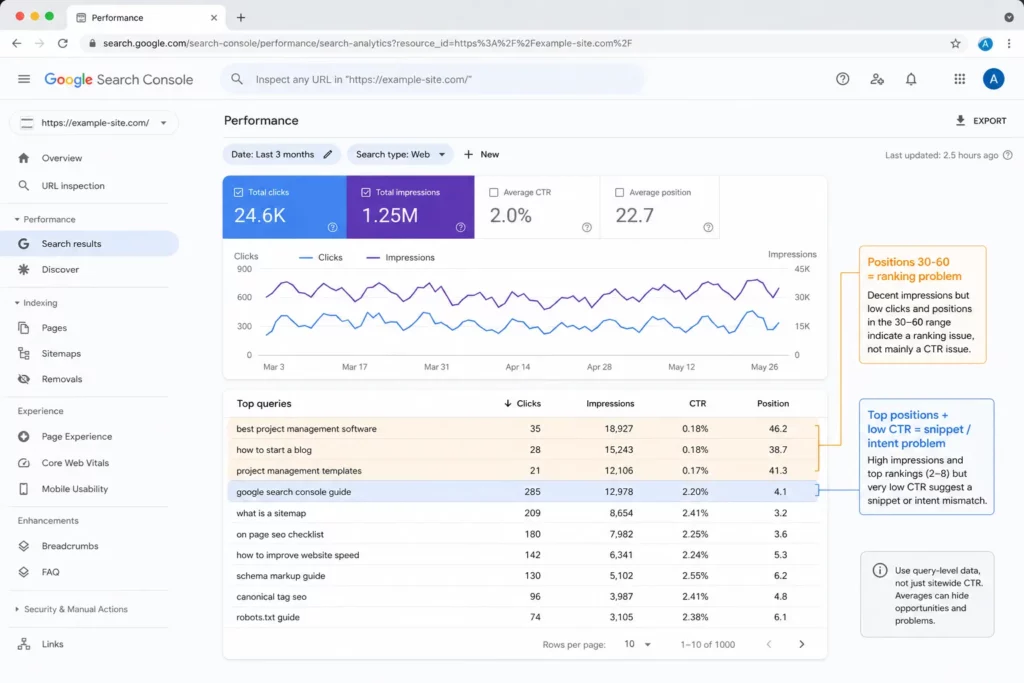
Use query-level GSC data to separate ranking problems from CTR problems.
A page appearing around positions 30 to 60 does not mainly have a click-through-rate problem. It has a ranking problem. In contrast, a page ranking near the top with strong impressions but unusually few clicks may have an unappealing title, mismatched search intent, weak brand trust, or competition from AI Overviews and other search features.
Therefore, diagnose the page using query-level data rather than relying on the website-wide CTR average.
What Does an Impression Mean in Google Search Console?
Google Search Console records an impression when a link or search feature connected to your website appears in Google Search under the conditions Google uses for that result type. A click is recorded when someone selects a link that takes them to your website.
An impression does not automatically mean that a user carefully noticed your listing. For example, your result may appear far below the first few results or inside a search feature that attracts limited attention.
In addition, Search Console data can change depending on whether it is grouped by property, query, or page. If several URLs from the same site appear for one query, property-level and page-level averages may not match.
Consequently, high impressions alone should not be treated as proof that your snippet is underperforming.
The r/bigseo discussion shows that SEO practitioners commonly examine exact queries, average positions, search intent, AI Overviews, and other SERP features before recommending changes.
Diagnosis Before Optimization
The missing element is a complete decision process.
Most guides explain what might cause low clicks. However, they do not fully separate:
- Low rankings from weak snippets
- Relevant impressions from irrelevant query exposure
- Branded searches from non-branded searches
- Desktop performance from mobile performance
- Country-specific differences
- Traditional organic results from AI and rich-result exposure
- Page-level data from property-level aggregation
- A CTR problem from a content-quality or authority problem
Therefore, the best starting point is not “rewrite the title.” The better question is: Which type of impression is this page receiving, and where does it appear when that impression happens?
1. Your Average Position Is Too Low
Ranking position is often the simplest explanation for a website getting impressions but no clicks.
A page can appear for hundreds of queries while ranking beyond the main click area. Therefore, its impressions may rise long before its traffic does.
Use this practical interpretation:
- Positions 1 to 5: Investigate the title, snippet, intent, trust, and SERP layout.
- Positions 6 to 20: Improve both ranking strength and search-result presentation.
- Positions 21 and lower: Treat it mainly as a content, relevance, or authority problem.
These ranges are diagnostic guidelines, not fixed Google rules. Nevertheless, they prevent you from spending hours testing meta descriptions on a page that ranks at position 48.
2. Google Shows Your Page for the Wrong Queries
A page may earn impressions for terms that are related to its topic but do not match its main purpose.
For example, a commercial SEO service page could appear for a beginner searching for a free SEO checklist. The words may be related, but the expected result is different.
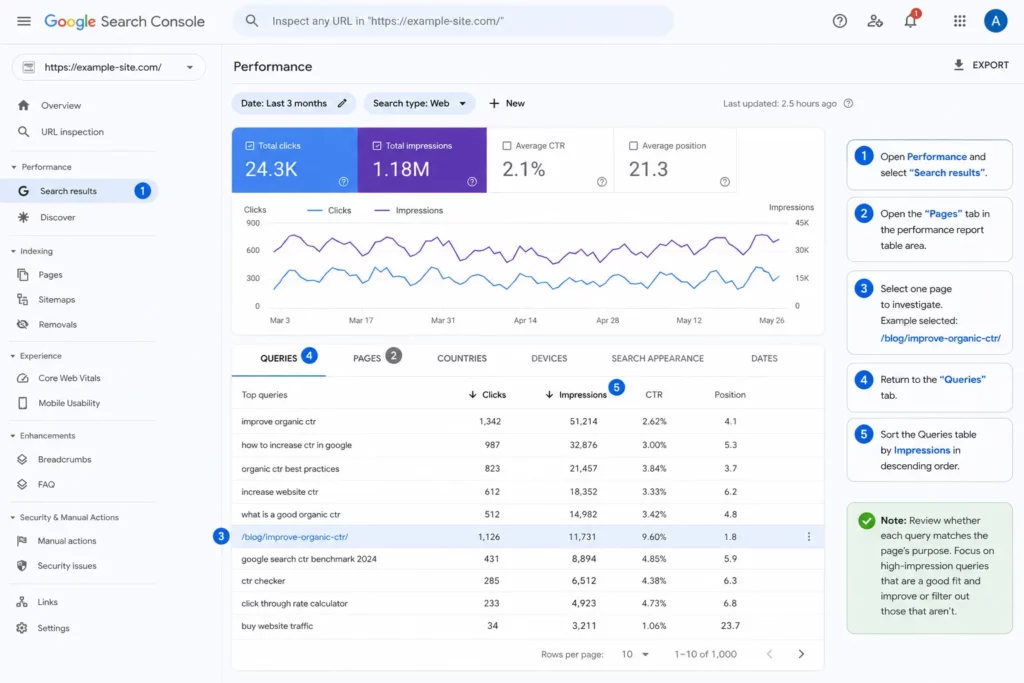
In Search Console:
- Open Performance and select Search results.
- Open the Pages tab.
- Select the page you want to investigate.
- Return to the Queries tab.
- Sort by impressions.
- Review whether each query matches the page’s purpose.
Google’s Performance report supports filtering by query, page, country, device, and other dimensions. Therefore, you can examine performance more precisely instead of relying on one site-wide number.
For a broader low-traffic diagnosis, read Scale Xpert’s guide on what to check when published blog posts still receive no traffic.
3. Your Title Does Not Give Users a Reason to Click
Your title link is often the most noticeable part of an organic search result. It should describe the page clearly and show why it is relevant to the query.
Google recommends concise, descriptive titles and warns against vague wording, unnecessary length, and keyword stuffing. Google can also generate title links from several sources, including the title element, visible headings, anchor text, and other prominent page content.
Compare these examples:
Weak title:
Organic Traffic Information
Stronger title:
Why Is My Website Getting Impressions but No Clicks? 7 Checks
The stronger version identifies a specific problem and sets a clear expectation.
However, make sure the visible H1, SEO title, and page content support the same promise. Otherwise, Google may display a different title link.
4. Your Meta Description Is Not the Only Snippet Google Uses
Rewriting the meta description is common advice, but it is not a guaranteed fix.
Google primarily creates snippets from the page content. It may use the meta description when that description provides a better summary for a particular search. In addition, Google may display different snippets for different queries.
Therefore, improve both:
- The meta description
- The opening paragraph
- Definitions near relevant headings
- Short answers to important questions
- Supporting text around the target keyword
A useful meta description should explain the problem, show the benefit, and match the page. Nevertheless, avoid treating it like advertising copy that overpromises what the article delivers.
5. AI Overviews and SERP Features May Reduce Traditional Clicks
A search result page may include AI Overviews, featured snippets, videos, images, maps, forums, People Also Ask results, and rich results.
As a result, your page can receive visibility without attracting the same number of clicks expected from a traditional list of blue links. Google confirms that appearances in AI features are included within overall Web performance reporting in Search Console.
The Google search interface also changes depending on the query, device, country, and language.
Search your main query manually and check what appears above your listing. If an AI Overview answers the basic question immediately, give users another reason to visit, such as:
- Original data
- A downloadable template
- Screenshots
- A detailed process
- First-hand experience
- A comparison table
- A tool or calculator
- Examples unavailable in the search summary
Generic information is easier to summarize without a click. Unique evidence and practical resources create a stronger reason to open the page.
6. Your Performance Changes by Device or Country
A page may perform well on desktop but poorly on mobile. Similarly, it may appear frequently in a country where the content, language, offer, or examples are less relevant.
Use Search Console filters to compare:
- Mobile versus desktop
- Main country versus other countries
- Branded versus non-branded queries
- Recent 28 days versus the previous 28 days
For example, a page may have a reasonable mobile CTR in its target market but thousands of low-position impressions from unrelated countries. In that case, the overall CTR can look worse than the page’s real performance with its intended audience.
7. The Page Needs Better Content, Internal Links, or Backlinks
When a page ranks between positions 8 and 20, a new title alone may not move it into the strongest click area.
Compare the page with the current top results. Look for missing examples, outdated facts, incomplete sections, weak formatting, unclear answers, and insufficient topical depth.
Next, add relevant internal links from established pages. Google uses links to find pages and understand their relevance, while descriptive anchor text provides context about the destination.
If the keyword is competitive, relevant external backlinks may also help the page build authority. Scale Xpert’s guide on how to get more backlinks explains several sustainable approaches.
A Simple Diagnostic Checklist
Use this checklist before updating a page:
- Is the page indexed and assigned to the expected canonical URL?
- Which exact queries produce the impressions?
- Are those queries relevant to the page?
- What is the average position for each important query?
- Does performance differ by device or country?
- Which search features appear for the query?
- Does the title clearly match the search problem?
- Does the opening content support the snippet?
- Is a different page competing for the same query?
- Does the page need stronger internal links or backlinks?
After making changes, record the date and compare a similar period. Avoid changing the title, content, URL, internal links, and page purpose simultaneously because you will not know which update affected performance.
For wider traffic improvements beyond CTR, see How to Increase Traffic on a Website.
FAQs
Is It Good That My Website Is Getting Impressions?
Yes, impressions show that your website is eligible to appear for searches. However, you must examine the queries and positions before deciding whether those impressions are valuable.
Why Do Impressions Increase While Clicks Stay Flat?
Your page may be appearing for more queries but ranking too low to earn clicks. It may also be gaining exposure through SERP features or searches that do not match the page closely.
What Is a Good Organic CTR?
There is no universal CTR that applies to every page. CTR varies by position, query type, device, country, brand familiarity, and the features displayed in the search results.
Should I Rewrite a Page With Impressions but No Clicks?
Rewrite it only after checking the queries and positions. If the impressions are relevant and the page ranks within reach of page one, an update may be worthwhile.
Can Changing the SEO Title Increase Clicks?
Yes, a clearer title may improve clicks when the page already ranks in a visible position. However, title changes will not solve a page that mainly appears beyond the first few result pages.
Do AI Overviews Cause Lower CTR?
They can change how users interact with results because some questions may be answered directly in search. However, Google also includes links in its AI features, so useful and distinctive content can still earn visibility and visits.
Can Internal Links Help a Page Get More Clicks?
Internal links can help search engines discover the page, understand its context, and identify its relationship to other content. They may support better rankings, which can then create more opportunities for clicks.
How Long Should I Wait After Updating the Page?
Google must recrawl and reprocess page changes, which can take from several days to several weeks for title-related updates. Monitor a meaningful comparison period rather than judging the result after one or two days.
Conclusion
A website getting impressions but no clicks does not automatically have a title problem. First, determine whether the page ranks too low, appears for the wrong queries, competes with search features, or performs differently across devices and countries.
Then apply the appropriate fix. Improve titles and snippets for pages already ranking visibly. Strengthen content, internal links, and backlinks for pages sitting lower. Reposition pages that attract irrelevant searches.
Most importantly, use page-level and query-level data instead of one site-wide CTR number. Diagnosis should come before optimization.
Want feedback on your Search Console data or content strategy? Join the community to learn with SEO professionals, website owners, and link-building partners.




