
Learning how to improve organic CTR does not begin with rewriting every title on your website. First, you need to find pages that already appear in Google Search but receive fewer clicks than their visibility should produce.
Google Search Console, often shortened to GSC, provides the data needed for this process. Its Performance report shows clicks, impressions, average click-through rate, and average position. Therefore, you can identify pages with existing search demand and focus your work where it has the strongest potential.
However, a low CTR does not always mean that a title is weak. A page may rank too low, appear for irrelevant queries, or compete with AI Overviews and other search features. This guide explains how to separate those problems and choose the right improvement.
Need help interpreting your Search Console data? Join the Scale Xpert Discord community to discuss organic CTR, content optimization, backlinks, and practical SEO strategies.
What Is Organic CTR?
Organic click-through rate is the percentage of Google Search impressions that produce clicks to your website.
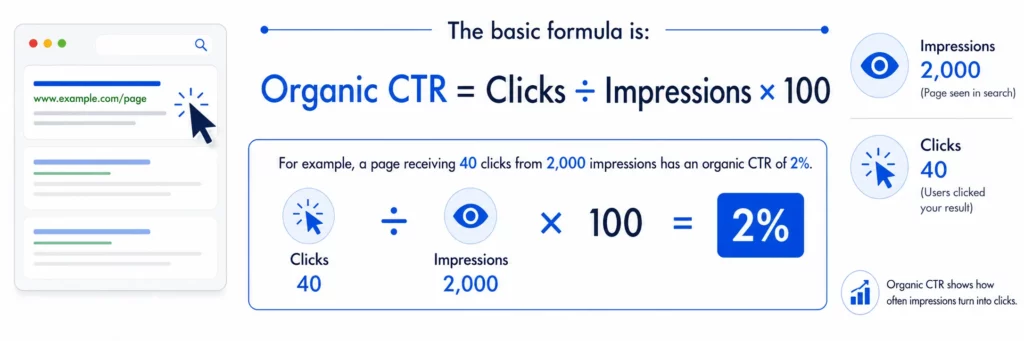
Google explains that impressions measure how often a result connected to your website appears, while clicks measure how often users select a link that takes them to your site. CTR is calculated by dividing clicks by impressions.
Nevertheless, CTR should never be judged without context. Position, search intent, device, country, brand recognition, and search-result features can all influence how frequently users click.
Why High-Impression, Low-Click Pages Matter
A high-impression page has already passed an important test. Google considers it relevant enough to display for one or more searches.
Therefore, you may not need to create an entirely new article. Improving the existing page could produce results faster than starting from zero.
These pages can reveal opportunities to:
- Improve SEO titles and snippets
- Better match search intent
- Expand incomplete content
- Strengthen internal links
- Target more relevant queries
- Improve rankings near page one
- Recover clicks lost to competing results
For additional traffic strategies beyond CTR, read on How to Increase Traffic on a Website.
How to Find High-Impression, Low-Click Pages in GSC
Google’s Performance report allows you to sort and filter search data by pages, queries, countries, devices, dates, and search appearance.
Follow this process to find your strongest organic CTR opportunities.
Step 1: Open the Search Results Report
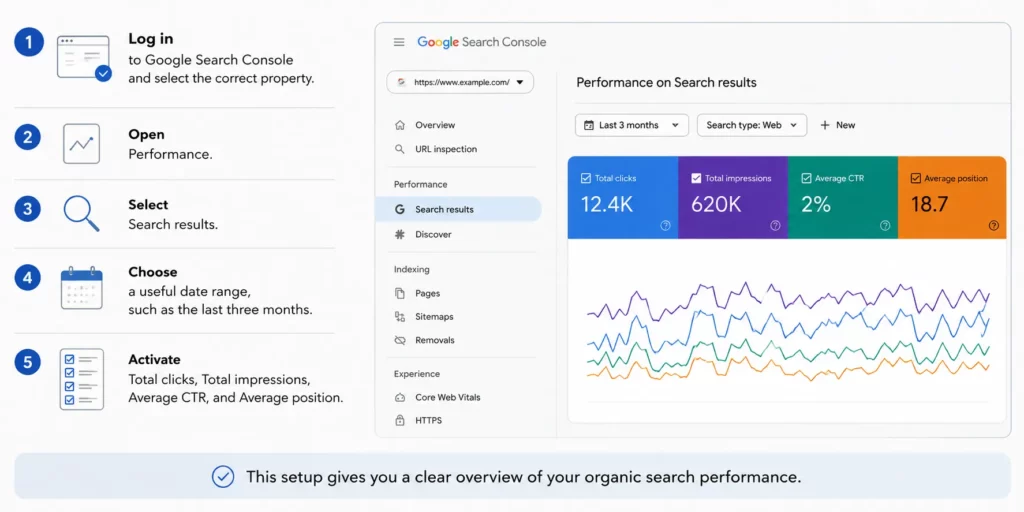
Google’s official Search Console guide provides a broader explanation of the reports available to website owners and SEO professionals.
Step 2: Open the Pages Tab
Scroll below the performance chart and select Pages.
The table now groups performance data by URL. Google notes that page-level totals can differ from property-level totals because the data is aggregated differently. Therefore, analyse individual pages instead of relying only on the website-wide CTR.
Sort the table by Impressions from highest to lowest.
Step 3: Identify Pages With Opportunity
Look for pages that have:
- Strong impression numbers
- Low or declining clicks
- Lower CTR than similar pages
- An average position close to page one
- Queries that match the page’s purpose
Pages ranking around positions 5 to 15 often deserve attention because they already have visibility and may be within reach of stronger click positions.
However, this is a working range rather than a universal benchmark. A position 12 result usually needs ranking improvements as well as better presentation.
Step 4: Select One Page and Review Its Queries
Click the URL you want to analyse. Search Console will apply a page filter.
Then open the Queries tab and sort by impressions. This shows which searches are causing that specific page to appear.
Google confirms that the Queries tab can be sorted by clicks, CTR, or impressions. However, some anonymized queries are omitted to protect user privacy.
Create a short list containing:
- High-impression queries
- Current clicks
- CTR
- Average position
- Search intent
- Whether the page answers the query
This query-level review is the most important part of learning how to improve organic CTR.
Separate CTR Problems From Ranking Problems
Not every high-impression, low-click page needs a new title.
Use the following diagnostic framework.
High Impressions, Low CTR, and Positions 1 to 5
The page is already visible. Therefore, investigate:
- An unappealing title
- A vague search snippet
- Search intent mismatch
- Weak brand recognition
- Stronger competitor titles
- AI Overviews or rich results
At this level, title and snippet improvements may have a meaningful effect.
High Impressions and Positions 6 to 20
The page may have both a ranking and CTR problem.
Improve the title, but also review content depth, internal links, topical relevance, and backlinks. A strong snippet cannot consistently overcome poor visibility.
High Impressions and Positions Below 20
Treat this mainly as a ranking problem.
The page may appear across many searches without being visible enough to attract clicks. Therefore, focus first on content quality, keyword targeting, internal links, and authority.
Check Whether the Page Matches Search Intent
Search intent describes what a person expects to find after entering a query.
A keyword may look relevant while requiring a different content format. For example, someone searching “organic CTR benchmark” may expect statistics, while “how to improve organic CTR” suggests a practical tutorial.
Compare the important queries with the current page and ask:
- Does the page answer the question immediately?
- Is the user looking for information, a tool, or a service?
- Do the top results use guides, lists, videos, or templates?
- Is the page targeting several conflicting intents?
- Does the title promise something the article does not provide?
Read Scale Xpert’s search intent guide for a deeper explanation of informational, commercial, navigational, and transactional searches.
If the intent is wrong, changing a few title words will not solve the problem. Instead, reposition the page or create a separate resource for the query.
Improve the SEO Title
The title link is often the most prominent part of an organic listing. Google describes it as a major source of information users consider when deciding which result to click.
A useful title should:
- Clearly describe the page
- Include the main topic naturally
- Match the dominant search intent
- Communicate a specific benefit
- Avoid keyword stuffing
- Distinguish the page from competing results
- Remain accurate after the click
Compare these examples:
Weak:
Organic CTR Guide
Better:
How to Improve Organic CTR Using Google Search Console
More specific:
How to Improve Organic CTR: Find Low-Click Pages in GSC
Google may create title links from the title element, visible heading, page content, anchor text, and other sources. Therefore, keep the SEO title, H1, and main page topic consistent.
For a broader diagnosis of titles and low-click pages, read Why Is My Website Getting Impressions but No Clicks?.
Improve the Search Snippet and Opening Content
A meta description can influence how users understand a result, but Google does not always display it.
Google primarily creates snippets from page content and may use the meta description when it provides a better summary for the query. Consequently, improve the page itself rather than editing only the description field.
Strengthen:
- The meta description
- The first paragraph
- Short answers below headings
- Definitions of important terms
- Lists that summarize the process
- Supporting text around key queries
The snippet should tell users what they will learn and why the page is useful. However, avoid clickbait claims that the content cannot support.
Review Device, Country, and Date Differences
A page’s overall CTR can hide important variations.
For example, the page may perform well on desktop but poorly on mobile because its title is truncated or competitors occupy more screen space. Similarly, impressions from countries outside your target market may reduce the average CTR.
Compare:
- Mobile versus desktop
- Target country versus all countries
- Last 28 days versus the previous 28 days
- Branded versus non-branded queries
- Individual queries versus page-wide performance
Search Console allows multiple dimensions to be filtered together. Therefore, you can isolate a specific audience, such as mobile users in one country.
Check the Actual Search Results
Search your priority queries manually before making changes.
Review:
- The titles used by top-ranking pages
- Featured snippets
- AI Overviews
- People Also Ask boxes
- Videos and image results
- Forum or Reddit listings
- Dates displayed in competing titles
- Brand names occupying top positions
Sometimes the low CTR is caused by the search-result layout rather than your snippet alone.
If Google answers a simple question directly, add value that cannot be fully summarized in the results. Original examples, screenshots, templates, downloadable resources, and first-hand analysis can create a stronger reason to click.
Measure the Results of Your Changes
Record the date whenever you update a title, snippet, or page section.
Then compare performance after Google has recrawled and processed the changes. Google explains that title-link updates may take from several days to several weeks to appear.
Monitor:
- Clicks
- Impressions
- CTR
- Average position
- Query relevance
- Conversions
- Performance by device
Avoid changing the title, URL, content structure, and search intent simultaneously. Smaller controlled updates make it easier to understand what improved the result.
FAQs
What Is a Good Organic CTR?
There is no universal good CTR. It varies according to position, query type, device, country, brand recognition, and the search features displayed.
Does a Low CTR Hurt Google Rankings?
A low CTR alone does not prove that a page will lose rankings. Use CTR as a performance signal for diagnosing how users respond to your search listing.
Which Pages Should I Optimize First?
Prioritize pages with high impressions, relevant queries, low clicks, and rankings close to the first page. These pages usually offer a clearer opportunity than URLs with almost no visibility.
Can Changing a Title Improve Organic CTR?
Yes, particularly when the page already ranks prominently and matches search intent. However, a better title will not solve a page that ranks too low.
Should I Update the Meta Description?
Yes, but also improve the opening content. Google may generate the search snippet from the page instead of using your written meta description.
How Often Should I Review CTR in GSC?
A monthly review works well for most websites. Larger sites or active publishing teams may review priority pages weekly.
How Long Should I Wait Before Evaluating a Title Change?
Allow enough time for Google to recrawl the page and collect meaningful performance data. In many cases, comparing several weeks provides a clearer result than checking after a few days.
Conclusion
Learning how to improve organic CTR starts with finding the right pages, not rewriting every title on your site.
Use Google Search Console to identify high-impression, low-click URLs. Next, examine their exact queries, average positions, search intent, device performance, and current search-result layout.
Improve titles and snippets when pages already rank visibly. However, strengthen content, internal links, and authority when low positions are the main problem.
By diagnosing each page before editing it, you can focus on opportunities with real search demand and turn existing impressions into more qualified organic traffic.
Want practical feedback on your GSC opportunities? Join the Scale Xpert Discord community to share SEO data, discuss title tests, and learn with website owners and SEO professionals.




